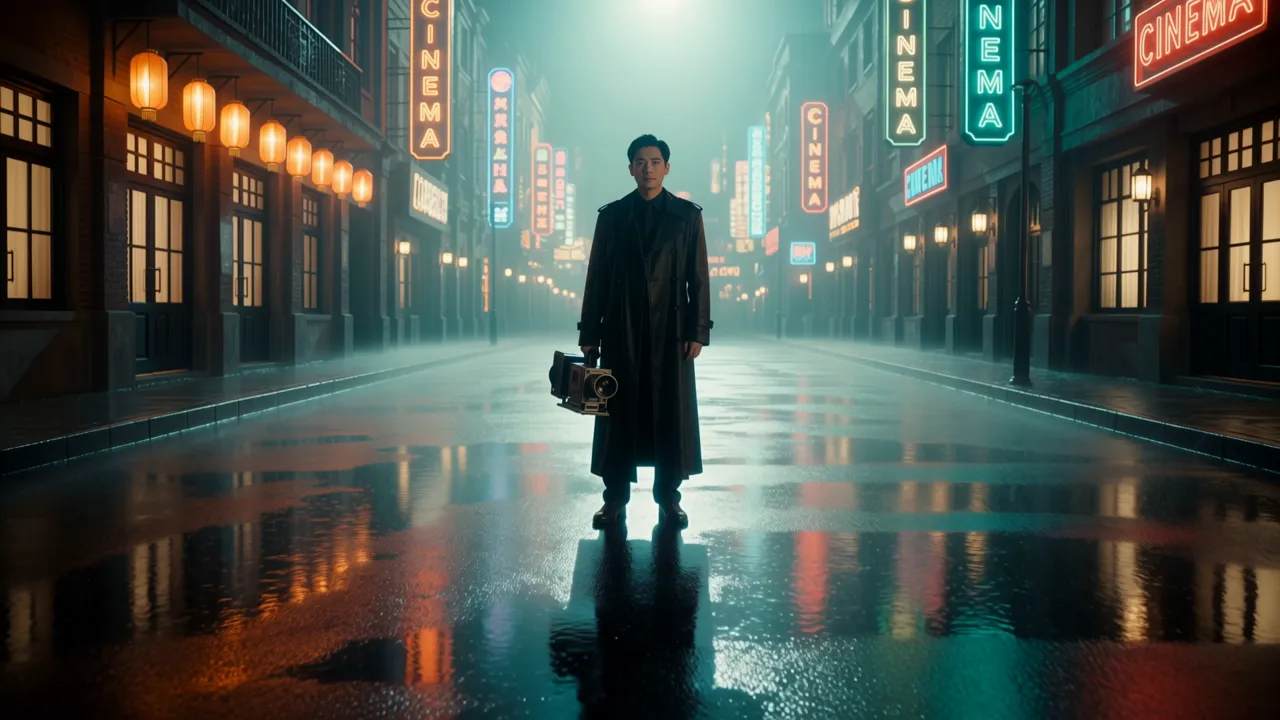
Long takes that stay coherent
One 30-second generation instead of six short clips that drift apart. A setup, a turn and a payoff fit in a single shot, and length is set in one-second steps from 3 to 30.
Kuaishou · New on Visiojoy, October 2026
Direct a whole 30-second scene in one pass. Pin a start frame, an end frame and up to 8 keyframes, add up to 15 image and video references, and get sound generated with the picture — running on Visiojoy, no extra Kling subscription.
Generated on this site from the prompt below, with no editing. Turn the sound on to hear the audio Kling 4.0 generated with it.
Prompt
Cinematic wide shot that opens already fully composed: a lone filmmaker in a long coat stands on a rain-soaked neon street at night, holding a vintage film camera, warm orange lanterns and teal neon signs reflecting in the puddles, light mist, shallow depth of field, anamorphic lens look. The camera slowly pushes in. Sound: soft rain, distant city hum.
Kling 4.0 is the newest generation of Kuaishou's Kling video model family, released in September 2026. Kuaishou frames the upgrade around three things: visual realism, creative control and narrative completeness.
In practice that means 30 seconds in one generation — enough for a setup, a turn and a payoff without stitching clips — plus keyframes that pin the moments the shot has to hit, and references that keep faces, products and places consistent. Audio is generated with the picture. On Visiojoy you can run it at 720p or 1080p in 16:9, 9:16, 1:1, 21:9. Visiojoy is an independent platform, not affiliated with Kuaishou.
Four reasons to pick it over a shorter, cheaper model.
One 30-second generation instead of six short clips that drift apart. A setup, a turn and a payoff fit in a single shot, and length is set in one-second steps from 3 to 30.
Pin a start frame, an end frame and up to 8 keyframes in between, and the model fills in the motion. A clip allows one frame more than its length in seconds, so 9 seconds and longer get the full 10.
Carry a face, a product and a location through the whole shot with up to 10 reference images and 5 reference videos — or copy a camera move from a clip you already have.
Spoken lines, effects and ambience are generated together with the picture, with lip movement matched to the dialogue. Write lines in quotes and say which language they're in.
Three ways to start a clip. The generator above takes a prompt, references, or a start image with keyframes and an end frame; the full settings panel is in the AI Video workspace.
You upload
Nothing — just a prompt
Describe the scene, camera and sound. Pick 16:9, 9:16, 1:1, 21:9 and up to 30 seconds. Best for exploring ideas before you have assets.
You upload
1 start image, up to 8 keyframes, optional end image
The clip opens on your start image and passes through each keyframe in order. The aspect ratio follows the start image. Keyframe and end-frame slots appear once you add it.
You upload
Up to 10 images and 5 videos
References set who, what and where; the prompt sets the scene. Refer to them in upload order. Choose a ratio or Auto to follow your references. Can't be combined with frames.
Kling 4.0 prompts for long takes, dialogue, references and keyframes. Click one to load it into the generator, then match the settings shown on the card.
Kling 4.0 makes up to 30 seconds in one generation. Break the scene into timed beats and keep one location so the shot stays coherent end to end.
0–10s: a steadicam shot follows a young woman into a crowded night market, lanterns overhead. 10–20s: she stops at a noodle stall, the cook flips noodles in a burst of steam. 20–30s: she takes the bowl, turns toward the camera and smiles, the camera slowly rises above the crowd. Sound: sizzling woks, chatter, distant music.
A lighthouse on a rocky cliff during a storm. Waves explode against the rocks, the beam sweeps through the rain. The camera slowly pushes in from far out at sea to the lighthouse window, where a keeper lights an oil lamp. Sound: thunder, crashing waves, wind howling.
Vertical shot. A man's alarm rings, he hits snooze, then jumps out of bed, opens the curtains to bright sun, makes coffee and drinks it at the window. Quick, playful pacing, fixed camera in the corner of the room. Sound: alarm beep, curtains, coffee machine.
Audio is generated with the picture. Write each line in quotes, say who speaks it and how, and keep the cast to two or three people.
A nervous young man sits across from an interviewer in a glass office. The interviewer looks up from his CV and asks: "So why should we hire you?" The young man takes a breath and answers: "Because I already fixed your website's login page." Alternating close-ups. Sound: office hum.
A grandmother stirs a pot in a small kitchen and says to her grandson, laughing: "Taste it, but don't tell your mother I added extra butter." He tastes it and gives a thumbs up. Warm light, handheld camera. Sound: bubbling pot, kitchen ambience.
Two podcast hosts at a desk with microphones. The woman says: "Okay, hot take: pineapple belongs on pizza." The man leans back, covers his face and groans: "We're going to lose half our listeners." Static two-shot, soft studio lighting. Sound: room tone, laughter.
Switch to Reference to Video and upload images and short videos. Refer to them in upload order and say what each one is for.
0–8s: a shop owner lifts the watch case from image 1 onto a wooden counter under warm shop light. 8–18s: cut to a close-up as the case opens, revealing the watch from image 2, slow push-in. 18–30s: hands lift the watch, shallow depth of field, light catching the dial. No dialogue, soft jazz underneath.
The woman from image 1 walks through a sunny flower market, stops to smell a bunch of peonies and laughs at something the florist says. Keep her face, hair and outfit exactly as in image 1. Tracking shot at waist height. Sound: market chatter, birds.
Use the camera movement from video 1. The red sports car from image 1 drives along a coastal road at sunset, the camera matching video 1's low tracking move and final swing around the front of the car.
Add a start image in the generator, then optional keyframes in between and an end frame. A clip allows one more frame than its length in seconds, up to 10.
A single oak tree on a hill, fixed camera. @first_frame is spring with fresh leaves; it turns into the full summer green of @keyframe_1, then the orange autumn of @keyframe_2, and ends in the snow of @last_frame. Smooth, continuous time-lapse. Sound: wind changing with the seasons.
Start on the pencil sketch of a sneaker in @first_frame. The lines fill in with color to become the 3D render in @keyframe_1, then the sneaker rotates and lands on a white studio floor as in @last_frame. Clean studio lighting. Sound: pencil scratches, then a soft beat.
The dancer from @first_frame moves through each pose in order: @keyframe_1, @keyframe_2, @keyframe_3, with fluid, natural movement between them. Empty rehearsal studio, side light from tall windows. Sound: footsteps on wood, a slow piano piece.
Three 30-second models with sound, all in the same model menu. Here's when to switch.
| Kling 4.0 | Seedance 2.5 | Wan 3.0 | |
|---|---|---|---|
| Clip length | 3–30s | 4–30s | 2–30s |
| Resolution | 720p – 1080p | 480p – 1080p | 480p – 1080p |
| Frame control | Start, end + up to 8 keyframes | Start and end frame | Start and end frame |
| References | 10 images, 5 videos | 9 images, 3 videos, 3 audio | 10 images, 5 videos, 5 audio |
| 720p cost | 29 credits / s | 63 credits / s | 16 credits / s |
| Pick it for | Planned shots with keyframes | Polished, audio-led scenes | Long clips on a budget |
Every major video model, one balance. Run the same prompt through Kling 4.0, Seedance 2.5, Wan 3.0 and Grok Imagine without four tabs and four subscriptions — then keep the version that actually looks right.
Credits work across every model, so you can draft cheaply on one and finish on another. Building an agent workflow? Kling 4.0 is also available through the Visiojoy MCP server.
You pay per second of video. The exact cost shows on the Generate button before you start.
| Resolution | Per second | 3s clip | 10s clip | 15s clip | 30s clip |
|---|---|---|---|---|---|
| 720p | 29 credits | 87 | 290 | 435 | 870 |
| 1080p | 43 credits | 129 | 430 | 645 | 1,290 |
Credit packs start at $9.90 for 640 credits — about 22 seconds of 720p Kling 4.0 video. With reference videos, billing switches to a lower per-second rate (720p 17 · 1080p 26) applied to the reference length plus the output length; a reference shorter than the clip counts as the clip's length, so a 10-second 720p clip with a 5-second reference costs 340 credits. Reference images, keyframes and end frames don't change the price. See plans and credit packs.
1
Write a prompt alone, or upload what has to stay consistent: a start image for keyframe mode, or up to 10 images and 5 videos in Reference to Video.
2
Write the scene as beats and put spoken lines in quotes. After adding a start image, add keyframes and an end frame and mention them by name, like @keyframe_1.
3
Pick 3–30 seconds and 720p or 1080p — 29 credits per second at 720p, 43 at 1080p. The cost shows before you start; download the video from the AI Video workspace.
Kling 4.0 is the newest generation of Kuaishou's Kling video model family, released in September 2026. It generates up to 30 seconds of video with native audio in a single pass, and can follow keyframes or a mix of image and video references. On Visiojoy it has been available since October 2026.
Yes. Kuaishou released Kling 4.0 in September 2026, and it has been live on Visiojoy since October 2026 for text-to-video, start-and-end-frame video with keyframes, and reference-to-video. You need an account and enough credits to generate.
Any whole number of seconds from 3 to 30, in a single generation. The default is 5 seconds.
On Visiojoy, Kling 4.0 outputs 720p or 1080p. Text-to-video offers 16:9, 9:16, 1:1, 21:9; Reference to Video adds Auto, which follows your references; with a start frame the clip keeps the start image's aspect ratio.
Not on Visiojoy yet. Kuaishou has announced 4K output for Kling 4.0, but the version available here generates 720p or 1080p; this page and the generator will update if 4K becomes available. If you need 4K today, Seedance 2.0 and Vidu Q4 both go up to 4K in the same model menu.
Keyframes are images the video passes through in order, between the start frame and an optional end frame. You can add up to 8 keyframes, and the total — start, keyframes and end — is limited to one more than the clip's length in seconds, up to 10. A 3-second clip can use 4 frames; 9 seconds and longer can use all 10. Keyframes need a start frame: add one in the generator and the keyframe and end-frame slots appear next to it.
In Reference to Video you can add up to 10 images (JPG, PNG or WebP, up to 30 MB each) and 5 videos (MP4 or MOV, 2–30 seconds each, up to 100 MB). Kling 4.0 doesn't take audio references. References can't be combined with a start frame or keyframes. Adding references requires signing in.
Yes. When you don't add reference videos, every Kling 4.0 clip comes with audio generated alongside the picture — dialogue with matching lip movement, sound effects and ambience. There's no switch to turn it off. Put spoken lines in quotes and say which language they're in.
It's billed per second of output: 29 credits at 720p and 43 at 1080p. A 5-second 720p clip costs 145 credits; a 30-second 1080p clip costs 1,290. With reference videos the rate drops to 17 / 26 credits per second but applies to the reference length plus the output length, and a reference shorter than the clip counts as the clip's length. Reference images, keyframes and end frames don't cost extra.
No — Kling 4.0 is a paid model. New accounts start with 8 free credits, but the shortest Kling 4.0 clip (3 seconds at 720p) costs 87. To generate, you need a credit pack (from $9.90 for 640 credits) or a subscription (from $15/month). No Kling subscription is required.
The headline changes are length and control: Kling 3.0 generates up to 15 seconds per clip, while Kling 4.0 makes up to 30 seconds in one pass and adds keyframes between the start and end frames. Kling 3.0 isn't offered on Visiojoy.
All three make clips up to 30 seconds with sound. Pick Kling 4.0 when you need the shot to hit planned moments — it's the only one with keyframes between the start and end frame. Pick Seedance 2.5 for audio references and polished scenes (63 credits per second at 720p), or Wan 3.0 for the lowest cost (16 credits per second at 720p).
Kuaishou offers Kling models to developers through its own API. Without setting up a separate account, you can also generate Kling 4.0 videos — including keyframes — from Claude, Cursor and other MCP clients through the Visiojoy MCP server, using the same credits as this website.
No. Visiojoy is an independent AI video platform and is not affiliated with Kuaishou or Kling AI. It offers Kling 4.0 alongside Seedance, Wan, MiniMax, Vidu, Grok Imagine and other video models in one account, with one credit balance.
Yes, once you've made a purchase. Videos created after your first purchase (any subscription or credit pack) can be used commercially; videos created before your first purchase are licensed for personal, non-commercial use only. Make sure you have the rights to the faces, products and footage in your references.
Write the beats, add keyframes or references, and generate a Kling 4.0 video with sound — all in the browser.