Visiojoy LogoVisiojoy
  • Home
Create
  • AI Video
  • AI Image
  • MCPMCP
  • Pricing

Zombie Couple Video Generator

Turn two photos — or one of you together — into a zombie love story. Works with your partner or your pet.

Who turns into a zombie?

By creating, you confirm you have permission to use these photos and agree to our Terms of Service.

Zombie couple video: the quick answer

Updated October 15, 2026

A zombie couple video is a 10–15 second AI clip where one partner has turned into a zombie, the other embraces them anyway, and a match cut jumps back to a happy memory from before the outbreak. To make one here, upload one photo of each person (or one photo of both of you), pick a scene and press Create. It usually takes a few minutes and costs from $1.14 a video — no app, template or editing needed.

How Much Does a Zombie Couple Video Cost?

A 10-second zombie couple video at 480p is 80 credits — from $1.14 a video. Buy a one-time credit pack, no subscription; credits never expire, and failed videos are refunded.

Mini Pack
640 credits
Standard Pack
1,360 credits
Large Pack
2,800 credits

What Is the Zombie Couple Video Trend?

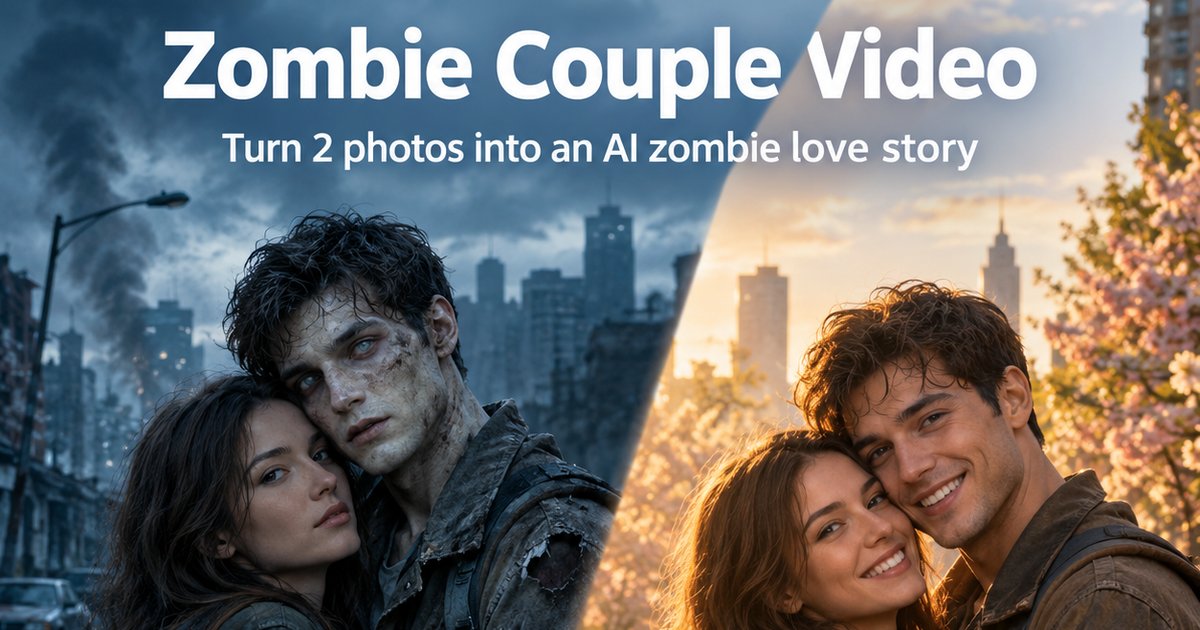
A zombie couple video is a short AI clip with a simple story: in a ruined world, one partner has turned. The other raises a flashlight on them — then recognizes them, lowers it and opens their arms. At the instant they embrace, the video cuts to a warm memory of the same two people before the outbreak.

It works because the conflict reads in one second, the emotion flips from dread to love, and the match cut makes people replay it to see how the transformation happened. You will also see it called the zombie love story, the AI zombie trend or the zombie hug video. It spread across TikTok, Reels and Shorts in the run-up to Halloween 2026, which is why so many couples are making one now.

Zombie couple video before and after the match cut: a survivor hugs her infected partner in a ruined city, then the same couple hugs, both human, in golden sunlight

How to Make a Zombie Couple Video in 3 Steps

From two photos to a clip you can post.

STEP 01

Upload your photos

Two photos work best: one subject each, face to the camera, even light. Photo 1 stays human, photo 2 turns. Making it with your pet? Choose "Your pet", put yourself in photo 1 and your pet in photo 2. Only have a couple photo? Switch to the "One photo of both" tab instead — the person on the right turns.

STEP 02

Pick a scene

Ruined City, Rainy Rooftop, Abandoned Mall, Forest Road or Halloween Night. Each scene comes with its own before-the-outbreak memory for the match cut.

STEP 03

Generate and post

Keep 9:16 for TikTok, Reels and Shorts, choose 10 or 15 seconds and press Create. Download the clip and add your favorite sad sound when you post.

Zombie Couple Video Generator Specs

Everything the tool takes and gives back, at a glance.

InputTwo photos, one person or pet each (most reliable), or one photo of both of you — JPG, PNG or WebP, up to 20MB
RolesWith two photos, photo 1 stays human and photo 2 turns into a zombie — a person, or your pet if you choose "Your pet" (then only the pet turns). With one couple photo, the person on the right turns — or your pet, if you choose "Your pet"
ScenesRuined City, Rainy Rooftop, Abandoned Mall, Forest Road or Halloween Night
StoryReveal, choice, embrace, then a match cut to a memory from before the outbreak
Length10 or 15 seconds
Aspect ratio9:16, 16:9 or 1:1 (9:16 by default)
Resolution480p or 720p
ModelsWan 3.0 or Seedance 2.0 (Wan 3.0 by default)
AudioAI-generated emotional score, no dialogue
Generation timeUsually a few minutes; finished videos are saved to your Library
Price80 credits for 10 seconds at 480p — from $1.14 a video; failed videos are refunded
PrivacyPrivate by default; you choose whether a video goes public
AccountSign in with Google; no app to install

3 Ways to Make a Zombie Couple Video

There is more than one way to join the trend. Pick the one that fits how much time, money and control you want.

CompareCapCut templateGenerate clips and edit them yourselfThis generator
CostFreePay for two or more video generations, plus your editing timeFrom $1.14 a video
What you getYour photos with zombie filters, effects and transitions — mostly still imagesA real video, if the two clips line up for the match cutA finished video story in one generation
Skills neededNonePrompt writing and cutting the two clips together in an editorNone — upload your photos and pick a scene
FacesYour original photosUp to you to keep both people consistent across separate generationsRoles locked by the prompt within one generation
Best forA quick free postFull creative controlThe full story without editing

Want it free and fast? A CapCut template is fine. Want to direct every shot? Generate the clips yourself and cut them together. Want the whole story — the zombie, the embrace and the match cut — from two photos without editing? Use the generator above.

The 4 Beats That Make a Zombie Love Story Work

Every zombie love story that lands follows the same arc. The tool writes all four beats into one generation — no editing, no second clip. Timings are for a 10-second video; 15 seconds gives each beat more room.

  1. Beat 1 · about 0–3s

    The reveal

    A cold, empty scene. The one who has turned stands across from the survivor — pale, cloudy-eyed, but still clearly themselves.

  2. Beat 2 · about 3–5s

    The choice

    The survivor raises a flashlight, recognizes them and hesitates. Then they lower it and open their arms.

  3. Beat 3 · about 5–7s

    The embrace

    The infected loved one stumbles forward and the two hold each other. This is the moment the whole video builds to.

  4. Beat 4 · about 7–10s

    The match cut

    On the hug, the scene cuts to a warm memory from before the outbreak — same pose, same framing, both of them human again.

How to Keep Both Faces Recognizable in a Zombie Couple Video

The hard part of this trend is not the zombie makeup — it is keeping the same person recognizable as a human, as a zombie and again in the memory. If the infected partner stops looking like themselves, the hug means nothing.

The tool locks the roles (photo 2, or the person on the right of a couple photo, turns; the other stays human) and tells the model to keep each face, hairstyle and build tied to its own character, with a mild zombie look — pale skin, cloudy eyes, worn clothes — instead of heavy prosthetics that hide who it is. You help most by using two separate, front-facing photos in even light, at a similar distance from the camera. If you only have a couple photo, choose one where both faces are clear and you are standing a little apart — two people close together in one frame are the hardest case for any video model. Glasses, a distinctive haircut or a favorite jacket carry through and make both versions easier to recognize.

Copy-Ready Zombie Couple Video Prompts

The tool above already writes the prompt for you. If you want to try it in another video tool, start from one of these and add your two reference photos.

Classic couple

Use two reference photos, one person per photo. Keep both faces, hairstyles and body types consistent throughout and never swap identities. PHOTO 1 is the human survivor, PHOTO 2 is the infected partner. Scene 1: an abandoned city street at dusk; PHOTO 2 is pale with cloudy grey eyes but clearly recognizable, no gore. PHOTO 1 hesitates. Scene 2: PHOTO 1 lowers their guard and opens both arms. Scene 3: PHOTO 2 stumbles forward and they embrace. Scene 4: match cut to the same street before the outbreak — both fully human, laughing and hugging in sunlight, same pose and framing. Vertical 9:16, about 10 seconds, no text.

Best friends

Two best friends, one per reference photo; keep both faces consistent and never swap them. A rainy rooftop at night: the friend from PHOTO 2 has turned — pale skin, cloudy eyes, torn hoodie, no gore. The friend from PHOTO 1 raises a flashlight, recognizes them and lowers it. They hug. Match cut to the same rooftop on a summer evening years earlier: both laughing under string lights in the same hug. Cold blue before the cut, warm gold after. Vertical 9:16, about 10 seconds.

Owner and pet

PHOTO 1 is a person, PHOTO 2 is their dog; keep the dog's breed, fur markings and collar. A foggy forest road in cold blue light: the dog has turned — dull grey eyes, matted fur, no gore — and slowly walks toward the owner, who kneels down and opens their arms. The dog leaps into the hug. Match cut to the same road on a golden afternoon: the healthy dog jumps into the owner's arms in the same pose. Vertical 9:16, about 10 seconds.

Zombie Couple Video Ideas

Anyone with a clear photo can star in it. Six versions to start from:

Couples

The original version. An anniversary post that says "I'd never leave you" better than a caption.

Husband and wife

Swap who turns: swap the two photos to make one version where you are the survivor and one where you are not.

Best friends

The friend who would never leave you behind — even after the outbreak.

Long-distance couples

You only need a photo of each person, so it works across cities and time zones.

You and your pet

Choose "Your pet", add yourself as photo 1 and your dog or cat as photo 2. Your pet turns, you stay human, and the tool asks the model to keep their breed, fur markings and collar.

Siblings

The brother or sister who would still share their last snack with you — zombie or not.

Make a Zombie Couple Video for Halloween

It fits the season without being a horror clip: the setup is spooky, the ending is sweet. Five ways to make it yours this Halloween:

Pick the Halloween Night scene

Fog, burned-out jack-o'-lanterns and torn decorations — then the match cut lands on the two of you in costume at a Halloween before the outbreak.

Two versions, one each

Make one where you turn and one where your partner does — just swap the two photos and generate again — then post them as a two-part Halloween story.

The party group chat

A 10-second clip that gets a reaction before the Halloween party even starts.

Use your costume photos

Already dressed as a zombie couple? Use photos taken in costume. How closely the outfit carries into the video depends on the model, so generate again if it drifts.

A long-distance Halloween

Can't be together on October 31? You only need one photo of each of you to send them this.

Zombie Couple Video vs. a Zombie Filter

A zombie filter changes how one face looks. A zombie couple video tells a story about two people.

FeatureZombie couple videoZombie filter
PhotosTwo — one per character, or one couple photoOne selfie
What changesA full story with two rolesYour face only
StoryReveal, choice, embrace, match cutNone
EndingCuts back to both of you as humansStays a zombie
OutputA 10–15 second video with soundA still or a short loop

Why Make Your Zombie Couple Video Here

It actually makes the video

Many zombie trend guides have you generate two clips and cut them together in an editor. Here you upload two photos and get the finished story — reveal, embrace and match cut — in one generation.

Roles are locked for you

Photo 1 always stays human and photo 2 always turns — your partner, a friend or your pet. The prompt tells the model to keep each face on its own character, so the two of you don't swap mid-video.

No prompt to write

The four-beat story, the lighting change and the match cut are built in. You only pick a scene.

Vertical by default

9:16 is ready for TikTok, Reels and Shorts. Switch to 16:9 or 1:1 before you generate if you post elsewhere.

Pay per video, not per month

A 10-second zombie couple video at 480p is 80 credits — from $1.14 with a credit pack, no subscription. If a generation fails, the credits it held go back to your balance.

Private by default

Your photos and videos stay in your own Library unless you choose to make a video public.

Your Photos, Your Call

Only use photos you have permission to use — yourself, or people who have agreed to it. Ask your partner before you turn them into a zombie, and never use celebrities or public figures.

Private by default. Your photos are uploaded to your account to make your video, and every video made here is private unless you choose to make it public.

Zombie Couple Video FAQ

What is a zombie couple video?+

It is a short AI video trend: one partner has turned into a zombie, the other lowers their guard and hugs them anyway, and at the moment of the embrace the scene cuts to a happy memory from before the outbreak. It is also called the zombie love story or AI zombie trend.

Can I make one with just two photos, or one couple photo?+

Both work. Add one photo of the survivor and one of the person who turns, or switch to the "One photo of both" tab and upload one couple photo, where the person on the right turns. Two separate photos are the more reliable option; a couple photo is quicker. The tool writes the story, the zombie look and the match cut for you.

Do I need CapCut, a template or prompt writing?+

No. There is nothing to edit or install. Pick a scene, press Create, and the whole story — including the cut back to the memory — comes out as one clip.

Which photo becomes the zombie?+

With two photos, photo 2 turns and photo 1 is always the human survivor; to switch roles, swap which photo goes in each slot. With your pet, choose "Your pet" and put them in photo 2 — only the pet turns. With one couple photo, the person on the right turns; to switch, flip the photo before you upload it.

How long is the video?+

Choose 10 or 15 seconds. Ten seconds is the sweet spot for TikTok, Reels and Shorts; fifteen gives the embrace and the memory more time.

Is there a zombie couple video app?+

You don't need one. This generator runs in your phone or desktop browser, so you can make and download your zombie couple video without installing anything.

Can I make a zombie couple video for Halloween?+

Yes. The trend took off in the weeks before Halloween, and it makes a good Halloween post or party clip: a spooky setup with a sweet ending. If you have a zombie couple costume, try photos taken in it. Because the story is about love, not scares, it also works for anniversaries, birthdays and Valentine's Day.

Is the zombie couple video generator free?+

Signing up is free and comes with 12 credits, but a 10-second video is 80 credits, so you will need a credit pack to make one. The $9.9 pack covers about 8 videos, and there is no subscription.

How much does a zombie couple video cost?+

From $1.14 a video. On Wan 3.0 at 480p, 10 seconds is 80 credits and 15 seconds is 120; 10 seconds at 720p is 160. Seedance 2.0 is 190 credits for 10 seconds at 480p. The Create button always shows the exact cost.

Can I use my pet instead of my partner?+

Yes. Set "Who turns into a zombie?" to "Your pet", then add yourself as photo 1 and your pet as photo 2 — or one photo of you together. Your pet turns and you stay human, and the tool asks the model to keep their breed, fur markings and collar. Use a clear photo with the face and eyes visible.

Why do faces sometimes get swapped, and how do I avoid it?+

Video models can mix up two people, most often when they look similar or share one photo. Two separate, front-facing photos in even light, at a similar distance from the camera, are the safest. If you use a couple photo, pick one where both faces are clear and you are standing a little apart. If a result still mixes you up, generate again.

Is the zombie look gory?+

It is not meant to be. The prompt asks for pale skin, cloudy eyes and worn clothes, and explicitly rules out blood and wounds — the trend is about love, not horror.

Does the video have sound?+

Yes, it comes with an AI-generated emotional score and no dialogue. Most creators add a trending sad sound inside TikTok, Instagram Reels or CapCut when they post.

Are my zombie couple videos private?+

Yes. Videos made here are private by default on every plan and stay in your Library. You can choose to make one public before generating.

More AI Video Tools on Visiojoy

Hotel Lobby Video

Another two-photo trend: your duo rapping in the orange booth.

AI Video Generator

Every video model in one workspace.

AI Image Editor

Fix the light or crop to one person before you upload.

Want full control instead? Open the AI video generator, add both photos as reference images and write your own zombie love story prompt. Need more credits? See plans and credit packs.

Love survives the apocalypse

Two photos, one embrace, one match cut. Private by default, and failed videos are refunded — make your zombie couple video now.

Create My Zombie Couple Video
  1. Home
  2. AI Video Generator
  3. Zombie Couple Video
Creative Tools
  • AI Image
  • AI Video
  • Text to Image
  • Image to Image
  • AI Image Editor
  • Unblur Image
  • AI DnD Map Generator
  • AI DnD Character Creator
  • AI Family Portrait Generator
  • All Tools
Image Models
  • Nano Banana 2.1
  • Nano Banana Pro
  • Nano Banana 2
  • Nano Banana 2 Lite
  • GPT Image 1.5
  • GPT Image 2
  • GPT Image 2.5
  • Seedream 5 Lite
  • Seedream 5 Pro
  • Seedream 4.5
  • Flux 2 Pro
  • All Image Models
Video Models
  • Seedance 2.5
  • Seedance 2.0
  • Seedance 2.0 Fast
  • Wan 3.0
  • Wan 3.0 Prime
  • MiniMax H3
  • Grok Imagine
  • All Video Models
Company
  • About
  • Contact
  • Pricing
  • MCP
  • Privacy Notice
  • Terms of Service
  • Refund Policy
  • Copyright Policy
© 2026 Visiojoy. All rights reserved.

Visiojoy

Visiojoy